MT4 · code and request checks
MT4 error 146: wait once, then check the entry again
Your entry can wait: my MT4 test made 0 requests during 1 synthetic busy cycle and accepted the fresh-price simulated retry.
Arnold Holm · 2026-10-13
What the error means
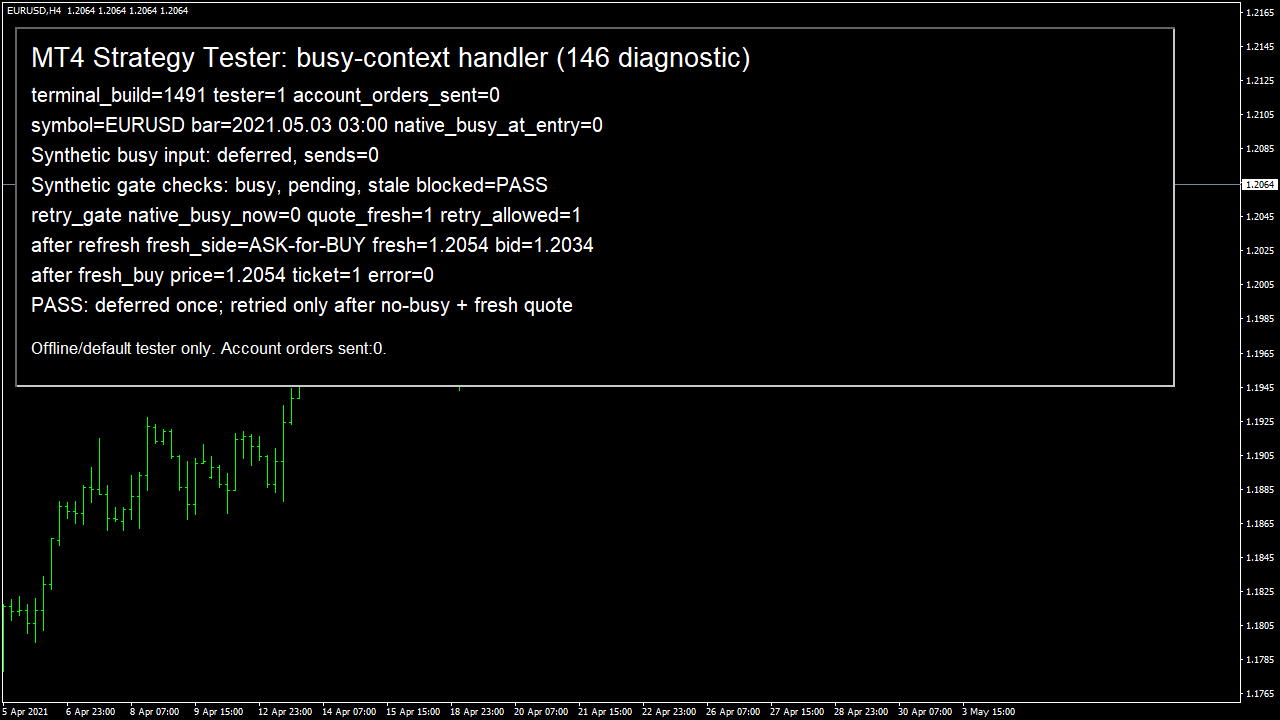
A trader asked, "Is it a problem of broker , my internet connection or EA ?" His EA sometimes failed to open an order with error 146. MetaQuotes describes IsTradeContextBusy as a check for a trading thread occupied by another EA. That gives you a useful first place to look: the other programs sharing your terminal. A valid entry signal does not give its request a private trading thread. I ran a small program in the native MT4 Strategy Tester, build 1491, on EURUSD H4. The terminal reported that its real trade context was clear. I supplied a synthetic busy input to test the decision to defer. That cycle sent zero requests. The helper checks also rejected a busy context, a pending cycle and a missing fresh quote. Once the context was clear and the quote had been refreshed, the test opened simulated ticket 1 with error 0. I keep the signal pending while the terminal is busy, then check whether the entry still makes sense before sending it.
Three code paths to check
1. Several EAs reach the send step together
Look for requests from different charts at the same time. Opening a trade is not the only operation worth recording. Closing and changing an order also use the terminal trading path. Keep each program name and symbol beside its request time. If several entries fall on the same new bar, that timing can explain why the signal looks fine while one request fails. Do not change the entry indicator merely because the terminal was occupied.
2. A retry outlives the original entry
Keep enough information to decide what the postponed signal meant. When the terminal becomes available, read the current quote and check the entry rule again. The price might have moved beyond the level you intended to trade. I would rather record a skipped entry than silently turn a time-sensitive signal into a later trade with different risk. A pending signal is a decision waiting to be checked, not permission to buy whenever a request becomes possible.
3. The same failure is sent in a tight loop
Give the retry a clear stopping point and leave time for another event to arrive. Record the failed request and its error before another function changes the error value. Then check the current terminal state and price before the next attempt. Also inspect existing orders before repeating an uncertain request, so a delayed acknowledgement does not lead to an extra position. A busy-state check can itself become outdated before the send, so the result of the send still needs to be handled.
The gates from my native test
These are the exact helper functions used in the test. I supplied busy and stale inputs to them, then read IsTradeContextBusy and the refreshed market prices for the simulated send. The fresh BUY used Ask 1.2054 and returned ticket 1 with error 0. Selecting that ticket confirmed a BUY, and the program closed the simulated position before leaving. The screenshot and Journal show those steps. The program refuses to run outside the Strategy Tester.
bool CanSendNow(bool nativeBusy,bool syntheticPending){ return(!nativeBusy && !syntheticPending); }
bool CanRetryAfter(bool nativeBusyNow,bool quoteFresh){ return(!nativeBusyNow && quoteFresh); }
This offline test checked synthetic busy inputs and one simulated order. It did not reproduce a real 146 rejection, concurrent EAs or account orders.
How you know it is fixed
Busy or pending means no send
The busy and pending helper inputs both close the send gate. The injected busy cycle recorded zero requests. If your program loses the signal during that pause, inspect when it marks an entry as completed.
A clear context still needs a fresh price
The helper rejected a missing fresh quote. With the context clear and refreshed Ask available, the simulated request returned ticket 1 and error 0. This checks the retry decision and a successful tester request separately.
Your five-minute Journal check
Open one busy-context failure in your Journal and compare the request times from every EA on that terminal with the next retry and its quote time. If the retry uses an older quote or a signal that is no longer valid, correct that handling before increasing the number of attempts.
Your own source
Find the next line to check
Start with the free EA-Check. Your code stays in your browser. It highlights patterns with line numbers; it does not prove the broker accepts an order.
Want one small change shown on your own case?
SOLVED-FIRST: one small fix or change to your own case, shown first as screenshots or a short screen video. 15 USD fixed (or the higher platform minimum), first five paid orders only during 4–17 October 2026. The file follows within 24 hours after funding. Close on Upwork first; marketplace cases stay on their marketplace.
Outside that sprint: R49: one authorised, reproducible MT4/MT5 defect, with three agreed cases. 49 USD fixed. Delivery within 48 hours after source review and funding. The exact case is agreed before funded work.
Send the expected and actual behaviourRelated checks
Common questions
Does a successful backtest prove that error 146 is fixed?
A single-EA tester run does not show two EAs competing for the real terminal trading context. It can check your postponement logic and fresh-price handling. Keep that distinction when reviewing a developer's screenshot or report.
Should the EA just wait until it can send?
Only if the entry rule still allows the postponed trade. Preserve the signal, limit the retry and read a fresh quote when the terminal is available. If the signal has expired, record the skip rather than opening a different trade.
Sources and limits
- Trader question: broker, internet connection or EA?
- Official MQL4 IsTradeContextBusy definition
- Official MQL4 OrderSend prices and return values
- Own native MT4 Journal: synthetic deferral and fresh simulated retry
These public questions explain the error; use your own EA log to check whether the same cause applies.