MT4 · code and request checks
MT4 error 4109: check permission before changing the signal
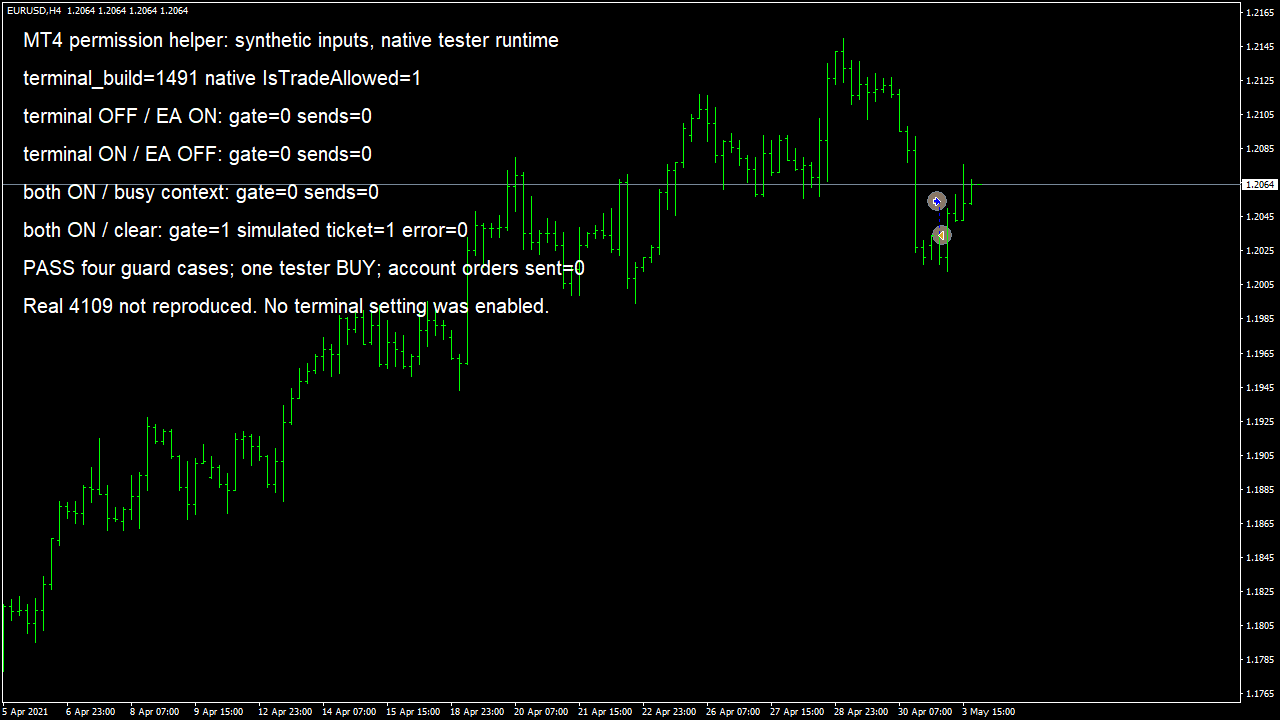
Your EA should send 0 requests when permission is off. My MT4 test rejected both disabled inputs and accepted 1 simulated order.
Arnold Holm · 2026-10-14
What the error means
A trader wanted a small MT4 script to open a BUY, but it stopped with error 4109. The script ran and exited before he could inspect its settings. His question was how to enable trading for a script that disappears so quickly. The thread later records his successful checkbox fix. In the official MQL4 error list, 4109 means trade is not allowed in the program properties. It is a different diagnosis from an invalid stop or insufficient funds. I ran my own permission helper in native MT4 build 1491 on EURUSD H4. I supplied disabled terminal and program inputs separately. Each closed the gate without sending. A busy-context input also closed it. With both permission inputs enabled and the real tester reporting IsTradeAllowed true, one simulated BUY returned ticket 1 and error 0. I check permission before changing the entry rule, and leave the intended trade blocked until its settings have been reviewed.
Three code paths to check
1. The EA or script is attached without trading permission
Check the Common tab for the exact program producing the failed request. An indicator and an Expert Advisor have different jobs, so confirm which file is actually issuing the order. For a script that exits immediately, its property declarations can make the input dialog appear before execution. The original trader discovered that a confirmation popup alone did not expose the trading checkbox. A developer can use the appropriate script property dialog rather than tell you to catch a window that has already disappeared. Keep a screenshot of the settings and the matching log time.
2. The terminal permission changed after the program was loaded
Read AutoTrading and the terminal Expert Advisors options alongside the program setting. Turning on one switch is not a complete diagnosis of every permission layer. The terminal may be configured to disable automated trading after certain account, profile or chart changes. If the EA stopped after such a change, compare that event with the Journal. I would record which layer was disabled before deciding to enable anything. A permission check should explain why an entry was skipped instead of leaving you to guess whether the signal disappeared.
3. A different failure is being treated as 4109
Capture the error immediately after the failed trade operation. Another function can change the stored last error before you print it. Keep the requested symbol, order side and program name beside the number. In MQL4, a busy context has its own code, 146, and server-disabled automated trading has code 4112. The same number in another platform can mean something else. Check the platform and the actual operation first. Repeated OrderSend calls cannot repair a disabled checkbox; changing lot size to solve a permission error can hide the original problem while adding another one.
The permission helper from my native MT4 test
The helper above is the exact function tested. Its inputs were deliberately supplied: terminal off and program on, terminal on and program off, both on with a busy context, then both on with a clear context. The first three rejected a send. For the allowed case, the program also read the real IsTradeAllowed value before OrderSend. It bought 0.10 simulated lots at Ask 1.2054, selected ticket 1 to confirm a BUY, then closed the simulated position. Compile errors and warnings were both zero. These separate checks make it easy to see whether a failure is in the guard or in the later order operation.
bool PermissionGate(bool terminalAllowed,bool programAllowed,bool contextBusy)
{
  return terminalAllowed && programAllowed && !contextBusy;
}
The disabled inputs were synthetic helper cases in the native tester. This run did not reproduce a real 4109 rejection or change a terminal trading setting. Account orders sent: zero.
How you know it is fixed
Either disabled permission prevents a send
Terminal-off and program-off inputs each produced gate 0 and zero requests. Preserve that behaviour so an entry cannot fall through into OrderSend after a skip was logged.
Both enabled still need a clear context
Both-on with a busy input produced gate 0. Both-on and clear produced gate 1, and the real tester allowed the simulated BUY with error 0. Recheck the send result even after a positive permission check.
Your five-minute check
Open the failed request in your MT4 Experts log. Compare its time with AutoTrading and the Allow live trading setting for that exact EA or script. Identify the disabled layer before editing the signal, lot size or stop distance. Keep your current settings until you understand what enabling them would cause the program to trade.
Your own source
Find the next line to check
Start with the free EA-Check. Your code stays in your browser. It highlights patterns with line numbers; it does not prove the broker accepts an order.
Want one small change shown on your own case?
SOLVED-FIRST: one small fix or change to your own case, shown first as screenshots or a short screen video. 15 USD fixed (or the higher platform minimum), first five paid orders only during 4–17 October 2026. The file follows within 24 hours after funding. Close on Upwork first; marketplace cases stay on their marketplace.
Outside that sprint: R49: one authorised, reproducible MT4/MT5 defect, with three agreed cases. 49 USD fixed. Delivery within 48 hours after source review and funding. The exact case is agreed before funded work.
Send the expected and actual behaviourRelated checks
Common questions
Does the checkbox fix every missing trade?
It addresses a disabled program permission. A missing entry can also come from the signal, terminal state, symbol rules or another rejected request. Read the actual error and its operation before choosing a fix.
Can I rely on a successful backtest for the live permission setting?
The tester checks the program behaviour in its own environment. Review the actual terminal and program settings separately. My run deliberately used synthetic disabled inputs and left account trading untouched.
Sources and limits
- Trader question about a script failing with 4109
- Official MQL4 permission and busy-context check
- Official MQL4 error definitions
- Own native MT4 Journal: four guard cases and simulated BUY
These public questions explain the error; use your own EA log to check whether the same cause applies.