MT5 · code and request checks
MQL5 zero divide: check the value before you divide
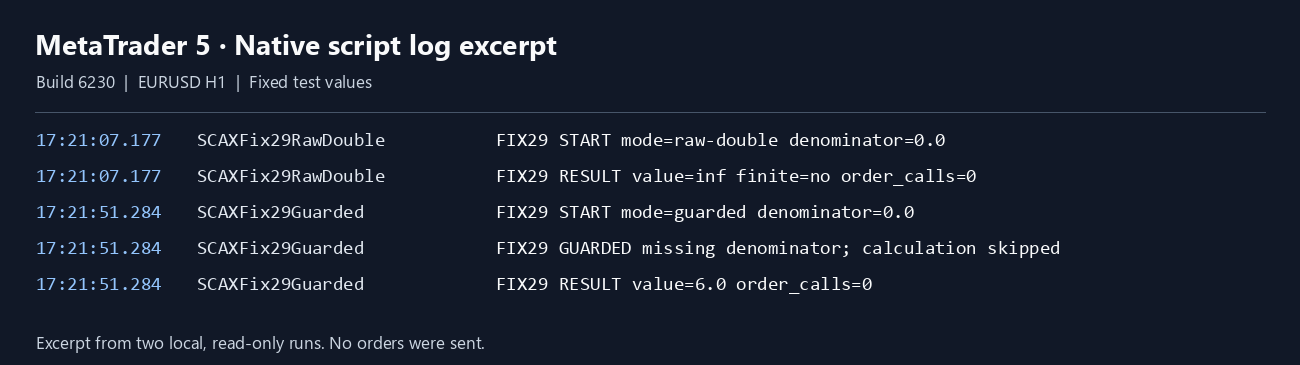
If your EA divides by a value it has not checked, start with the input. In my MT5 build 6230 script, an unchecked double divided by zero produced infinity, and the guarded run skipped that calculation and got 6 when the denominator was 2.
Arnold Holm · 2026-11-04
What the error means
An EA is a program that applies your trading rules in MT5. A denominator is the number you divide by. Missing history means MT5 has no price for a bar your EA asks for. If a price query returns zero, that zero can reach the division. A bad value can pass through and feed your next rule. The MQL5 runtime documentation lists zero divide as critical. I ran two read-only runs on EURUSD H1 in MT5 build 6230. The raw result read false on MathIsValidNumber. In the second run, I checked the input before dividing and tested the result again before using it. Both runs compiled with zero errors and zero warnings and placed no orders.
Three code paths to check
1. A price query can fail
iClose is a call that reads the close price of one bar. The official iClose reference says it returns zero if the call fails. Capture the immediate error before doing anything else. Skip on the zero even if that error value is 0.
2. There may be nothing to average
If your count is zero or negative, skip the calculation. A zero count means there is nothing to divide by. Do not replace a missing denominator with 1 or a tiny epsilon. That swap hides the gap and builds a fake signal.
3. The result can still be invalid
Check the result with MathIsValidNumber before you use it in another rule.
Guard the input and check the result
Pass how many values you added. False means you have no result to use. The first check blocks a bad count before the division, and the second check blocks a bad result after it. If a separate calculation uses an iClose price as its denominator, call ResetLastError immediately before iClose and GetLastError immediately after it. A later call can change the error.
bool TryAverage(double total, double count, double &result)
{
   if(count <= 0.0 || !MathIsValidNumber(count))
      return false;
   result = total / count;
   return MathIsValidNumber(result);
}
I set the test values in the code, so this was not a live gap in history. It says nothing about your broker feed or how a rule would have traded. This test does not show why a particular data query failed. To find that cause, compare the failed query with a working request for the same symbol and bar length.
How you know it is fixed
Zero stays zero
Try 12 with a count of 0. The calculation should be skipped. Repeat with 2 and check that the result is 6.
Log the exact data request
Keep the symbol, timeframe, bar shift, denominator and immediate data error on one log line. Skip the signal when the input is missing and retry the data request later. Symbol is the chart name like EURUSD. Timeframe is the bar length like H1. Bar shift is how many bars back you asked for. One line keeps the cause with the skip.
Check before using the value
Reject a nonfinite result instead of forwarding it to the next rule.
Your own source
Find the next line to check
Start with the free EA-Check. Your code stays in your browser. It highlights patterns with line numbers; it does not prove the broker accepts an order.
Want one small change shown on your own case?
DEMO0: send the problem and try a free compiled demo first. R49: one authorised, reproducible MT4/MT5 defect in readable source up to 500 lines, with three agreed cases. 49 USD fixed. Delivery within 48 hours after source review and funding. The exact case is agreed before funded work.
Send the expected and actual behaviourRelated checks
Common questions
Does zero always mean the market price was zero?
No. iClose can return zero if the data request fails. Keep the immediate error in the log and skip that calculation.
Does this test cover live broker history?
No. I ran two read-only scripts with fixed input on EURUSD H1. Neither made an order call.
Sources and limits
These public questions explain the error; use your own EA log to check whether the same cause applies.