MT4 · code and request checks
MT4 error 129: why rounding your price can still fail
Your price can have the right decimals and still be wrong for a market order. In my MT4 test, 3 local checks passed and the current Ask opened a simulated BUY. The unrounded request failed with a different error from 129. I check the requested price against the current quote before changing the signal.
Arnold Holm · 2026-10-16
What the error means
A trader described an EURJPY SELL that failed with error 129 despite rounding and refreshing prices. The requested entry came from a calculated level near the displayed Bid. The useful question was where that entry price came from. A level that triggers your strategy and the price used to open a market order have different jobs. The original discussion shows that confusion clearly. An EA is a program that applies your trading rules. It can wait for a level to be crossed, then send a market request using the current quote. It does not need to reuse the crossed level as the execution price. If your intention is to wait for a specified entry price, the required pending order and its placement rules need a separate check. The official OrderSend reference identifies 129 as an invalid requested price. It describes missing price history and incorrect decimal normalization as causes. It also distinguishes a fully outdated price, which can produce 138, from an older price still present in the price history. Slippage does not repair every rejected price.
Three code paths to check
1. The wrong quote.
A market BUY opens using Ask. A market SELL opens using Bid. If the EA trades a different symbol from its chart, get that symbol's quote rather than using the chart's price. Keep the order type and symbol beside the price in your log.
2. A calculated value with extra precision.
Arithmetic can produce a price between the symbol's displayed decimal increments. Rounding addresses that precision problem. It does not establish that the resulting number is the correct market quote. Keep both the original number and the value actually submitted.
3. A quote captured too early.
Work between reading a quote and sending a request can leave the stored value behind the market. Refresh the quote near the request, then capture the result immediately. A screenshot taken later cannot establish the values used earlier. Repeated retries without those values make the original problem harder to see.
Three local checks and two simulated requests in MT4
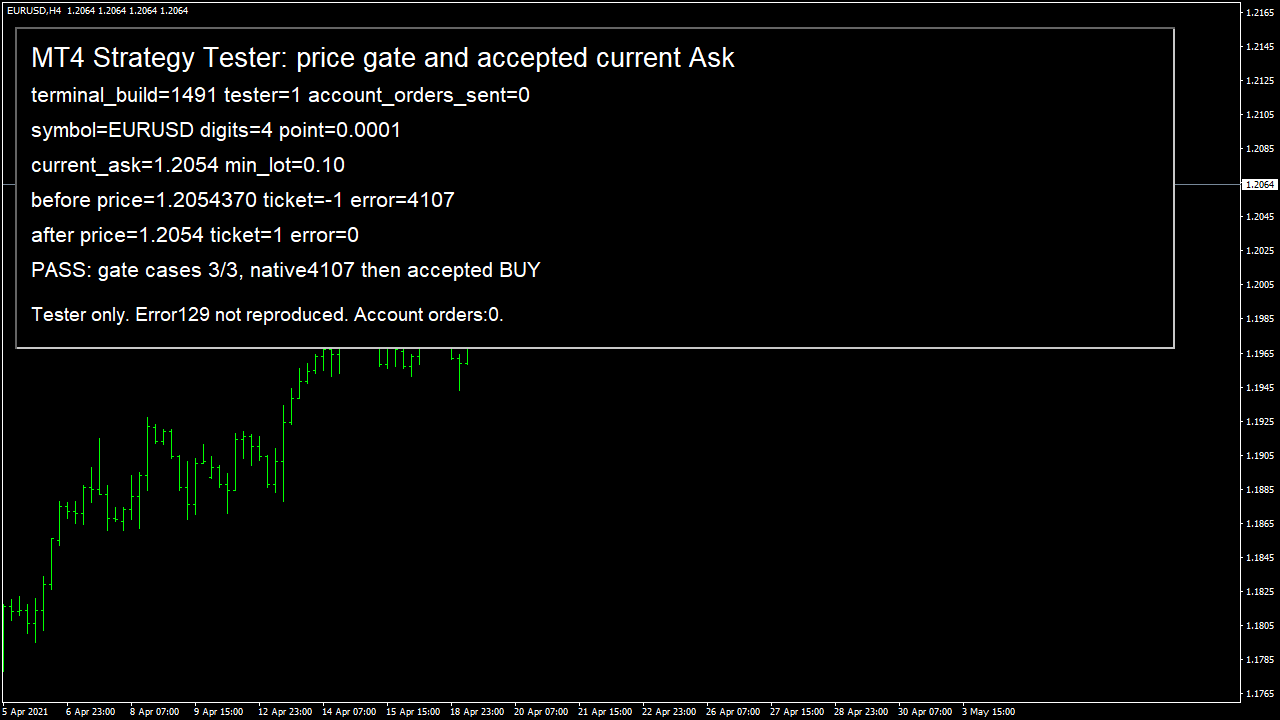
I used the MT4 historical simulator, called the Strategy Tester, with an EA that refuses to run outside that simulator. The native compiler reported zero errors and warnings. The local guard rejected zero, rejected a price containing a fractional point and accepted current Ask. Those were the three local checks. The deliberately unrounded BUY request used 1.2054370 and returned 4107. I kept that result, including the first run that had expected 129. The next request used the refreshed Ask of 1.2054. It opened simulated ticket 1 with error 0. The recorded opening price matched the submitted value, and the simulated position was closed afterward.
bool ValidBuyPrice(double price){
 if(!MathIsValidNumber(price) || price<=0 || Ask<=0 || Point<=0)return false;
 if(MathAbs(price-NormalizeDouble(price,Digits))>Point*0.0001)return false;
 return MathAbs(price-Ask)<Point*0.1;
}
This run did not reproduce error 129 or establish broker acceptance. It sent zero account orders. The actual fractional-price error was 4107.
How you know it is fixed
Missing price remains blocked
The tested local guard rejects zero. A missing quote does not silently become another entry level.
Fractional precision stays visible
The local guard rejects the fractional price. The native unrounded request returned 4107, retained under its actual number.
Your five-minute request check
Open one rejected request and compare its submitted price, Bid, Ask, symbol, order type and timestamp from the same event. Check where the submitted value was assigned. Was it a current quote, a saved quote or a strategy level? Save the actual error immediately after the failed request. Keep local validation results separate from the returned error number.
Your own source
Find the next line to check
Start with the free EA-Check. Your code stays in your browser. It highlights patterns with line numbers; it does not prove the broker accepts an order.
Want one small change shown on your own case?
SOLVED-FIRST: one small fix or change to your own case, shown first as screenshots or a short screen video. 15 USD fixed (or the higher platform minimum), first five paid orders only during 4–17 October 2026. The file follows within 24 hours after funding. Close on Upwork first; marketplace cases stay on their marketplace.
Outside that sprint: R49: one authorised, reproducible MT4/MT5 defect in readable source up to 500 lines, with three agreed cases. 49 USD fixed. Delivery within 48 hours after source review and funding. The exact case is agreed before funded work.
Send the expected and actual behaviourRelated checks
Common questions
Will NormalizeDouble fix every MT4 error 129?
No. It addresses decimal precision. The requested symbol, quote, order type and timing still need checking.
Did this test reproduce error 129?
No. The unrounded request returned 4107. The next BUY used current Ask and opened in the simulator. No account orders were sent.
Sources and limits
- Trader question: a calculated SELL entry still fails after rounding
- Official MQL4 OrderSend reference
- Own native MT4 run log
These public questions explain the error; use your own EA log to check whether the same cause applies.