MT4 · code and request checks
MT4 error 130: Invalid stops. Check which side your stop is on
Your EA can miss a valid entry with error 130 when its stop is on the wrong side of the price. My BUY stop above Bid failed in the native MT4 tester. Moving it below Bid allowed the simulated request.
Arnold Holm · 2026-10-05
What the error means
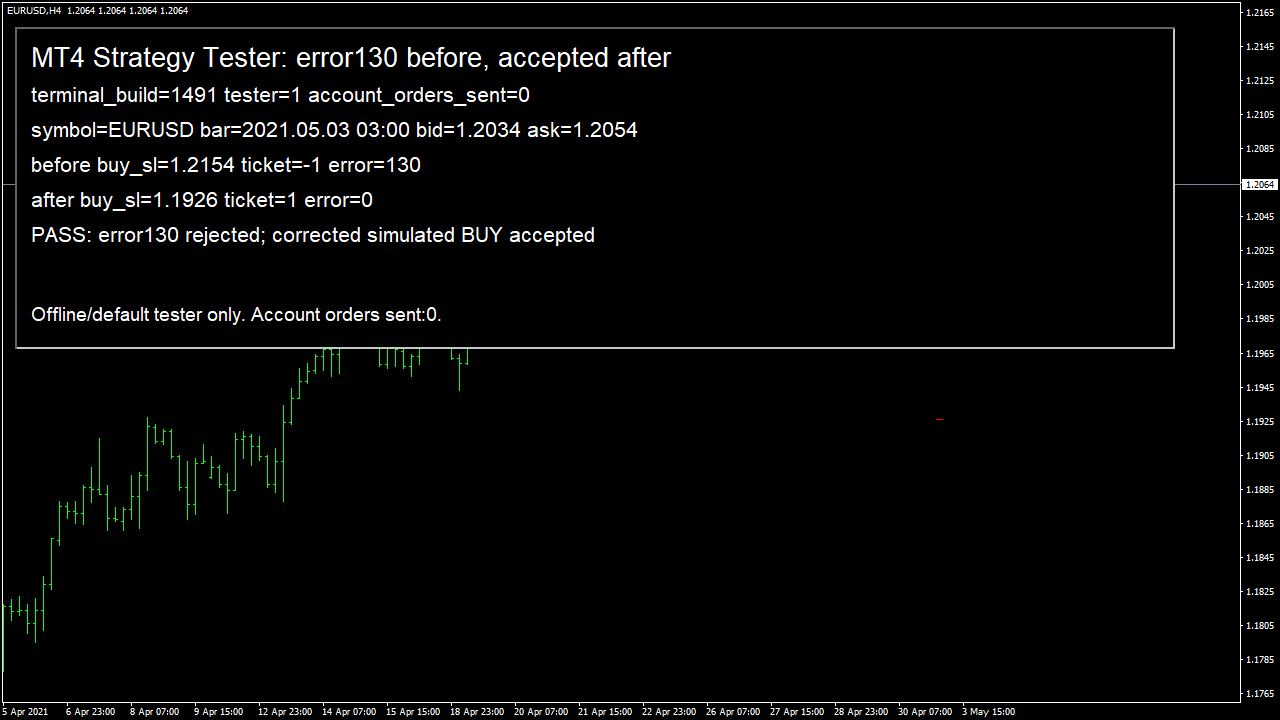
I check which side the stop belongs on before increasing its distance or changing the cash risk. Open one failed request in your Journal and compare the saved stop price with Bid for a BUY or Ask for a SELL. I ran my own small EA in native MT4 build 1491 on the supplied EURUSD H4 history, using 03 May 2021 and a fixed 20-point tester spread. A backtest is a historical simulation. This run checks one software error, rather than a strategy's returns. The tester could not connect to the demo server and explicitly used its default symbol settings. Its Bid was 1.2034 and Ask was 1.2054. I sent a simulated BUY with a stop at 1.2154, above both quotes. OrderSend returned -1, and the immediately saved error was 130. I kept the BUY direction and changed its stop to 1.1926, below Bid and beyond the tester's 8-point minimum. The next simulated request returned ticket 1 and error 0. I then read the simulated order: its saved stop matched 1.1926. The EA closed that simulated ticket after the check. Its first guard rejects every launch outside the Strategy Tester, and the account's automatic-trading permission was disabled. No request went to a demo or live account. The screenshot comes from the native tester chart itself. These prices belong to this historical test with default settings; your current broker quote, spread and minimum distance can differ. An EA is a program that applies your trading rules in MetaTrader. Error 130 is ERR_INVALID_STOPS: MT4 rejected a stop or an order-entry price. It tells you which request failed, while the saved prices tell you what to inspect next.
Three code paths to check
1. Stop direction or unit does not match the order
A BUY closes against Bid and a SELL closes against Ask. Your protective BUY stop belongs below Bid; your protective SELL stop belongs above Ask. The wrong-side BUY stop in my run failed even though it was far away. A cash-risk number cannot be subtracted directly from a quote without converting money into a price distance for the symbol and order size. In the linked forum question, a SELL stop was calculated below a historical close. More slippage does not correct that direction. Keep cash, points, pips and absolute prices separately named.
2. The calculation uses another symbol's quote or price grid
Bid, Ask, Point and Digits describe the current chart. If your EA sends an order for another symbol, it must read that symbol's prices and settings. Save the requested levels, current Bid/Ask, point size, digits and tick size. Decimal rounding alone does not put a price on an instrument's allowed price steps. Check the rule's intended price and distance after rounding to those steps. A repair must preserve your risk rule, rather than silently moving a stop just to get an order accepted.
3. The server distance rule or pending-entry path is ignored
MODE_STOPLEVEL is stated in points, not pips or cash. For pending orders, check both the entry's distance from the market and its stops against the pending-entry price. A zero stop level is not proof that every distance is allowed: the official OrderSend reference says a server may apply dynamic restrictions that cannot be represented by a fixed terminal value. A quote can also move between your local check and server processing.
Keep your error 130 and the exact request prices
Pass the exact values sent by your failing request, rather than prices calculated later. I used this same logging function in the native before/after run. It printed error 130 beside stop 1.2154, then error 0 beside stop 1.1926. The function below sends no order, changes no stop and performs no retry. Its quote reads happen after the rejection. Also save a quote immediately before your existing send, and label both readings with their times. GetLastError must be saved first: later terminal calls can change it.
// Call from your existing failure branch, immediately after OrderSend.
// Save the error BEFORE any other terminal call.
// int savedError = GetLastError();
// LogStopRequest(symbol, command, requestedPrice, sl, tp, savedError);

void LogStopRequest(string symbol, int command, double requestedPrice,
                    double sl, double tp, int savedError)
{
   int digits = (int)MarketInfo(symbol, MODE_DIGITS);
   Print("stop-check symbol=", symbol, " cmd=", command,
         " error=", savedError,
         " requested=", DoubleToString(requestedPrice, digits),
         " sl=", DoubleToString(sl, digits),
         " tp=", DoubleToString(tp, digits),
         " bid=", DoubleToString(MarketInfo(symbol, MODE_BID), digits),
         " ask=", DoubleToString(MarketInfo(symbol, MODE_ASK), digits),
         " point=", DoubleToString(MarketInfo(symbol, MODE_POINT), digits),
         " stopLevelPoints=", MarketInfo(symbol, MODE_STOPLEVEL),
         " tickSizePoints=", MarketInfo(symbol, MODE_TICKSIZE));
}
The displayed function only logs your existing request. The separate tester-only EA produced the screenshot and read back the corrected simulated stop. The test used offline/default settings and one BUY case. A live broker can apply other distances, price steps or dynamic restrictions. Check those settings separately for your symbol and authorised source. Keep retries bounded, and keep protection on the order. Cash-risk sizing, margin, volume and duplicate-order handling need their own checks.
How you know it is fixed
Check1: the corrected stop is actually recorded
In my native BUY test, the corrected request returned ticket 1 and error 0. Reading that simulated order confirmed its stop matched 1.1926. For your EA, use the actual symbol's quotes and allowed price steps. Check the recorded stop after acceptance, rather than treating the return value alone as the end. Test the SELL direction separately before calling both paths fixed.
Check2: a stop on the wrong side is rejected
The native tester rejected my BUY stop above Bid with error 130 and returned no ticket. Your EA should reject that wrong-side stop locally before sending. Check the opposite mistake too: a SELL stop below Ask. Keep the direction, absolute stop price and quote in the log. Do not remove protection or retry the same invalid request on every tick.
Check3: your broker's special distance rules
The default tester reported an 8-point minimum here. That value does not cover a broker with a floating distance rule or your pending-order path. Check each separately. A zero stop-level reading still leaves the other request fields to validate. Keep an unexplained server rejection as a rejection, and stop the bounded attempt rather than changing your risk rule automatically.
I can fix it for you
If the three agreed tests don't pass, you get your money back. I fix one authorised, reproducible MT4 or MT5 defect in readable source up to 500 lines. The fixed price is 49 USD. Delivery is within 48 hours after source review and funding.
Free demo of your fixCheck my EA locallyRequest a free demo of your fix
Related checks
Common questions
Does MODE_STOPLEVEL equal to zero rule out error 130?
No. It can mean no minimum distance, or a dynamic server restriction that the terminal cannot express as a fixed value. Keep the rejection and ask for the actual symbol's specification instead of treating zero as permission.
Should I increase slippage or remove the stop?
Neither fixes a stop on the wrong side or a cash amount used as a price distance. First identify the failing request field. Any two-stage placement that opens before adding protection changes exposure and needs an explicit agreed rule; this pattern does not implement it.
Does this page prove my broker will accept the corrected request?
No. It shows a native tester rejecting one wrong-side stop and recording the corrected simulated stop under its default settings. Your broker's acceptance and recorded protection need a separate demo check for your source, symbol and account settings. Nothing here predicts returns or challenge passing.
Sources and limits
- Official MQL4 OrderSend errors and floating stop-level rule
- Official MQL4 symbol-property units
- Official BUY, SELL and pending-order distance table
- Observed question: error 130 with a SELL stop and a cash-risk amount
These public questions explain the error; use your own EA log to check whether the same cause applies.