MT4 · code and request checks
MT4 error 131: 0.05 lot failed, 0.10 passed in the tester
If your MT4 EA shows error 131, check the lot size against this symbol. My native tester rejected 0.05 lot with 131 when the minimum and step were 0.10. The corrected 0.10 lot request opened a simulated order with error 0. A smaller number can still be an invalid order size.
Arnold Holm · 2026-10-07
What the error means
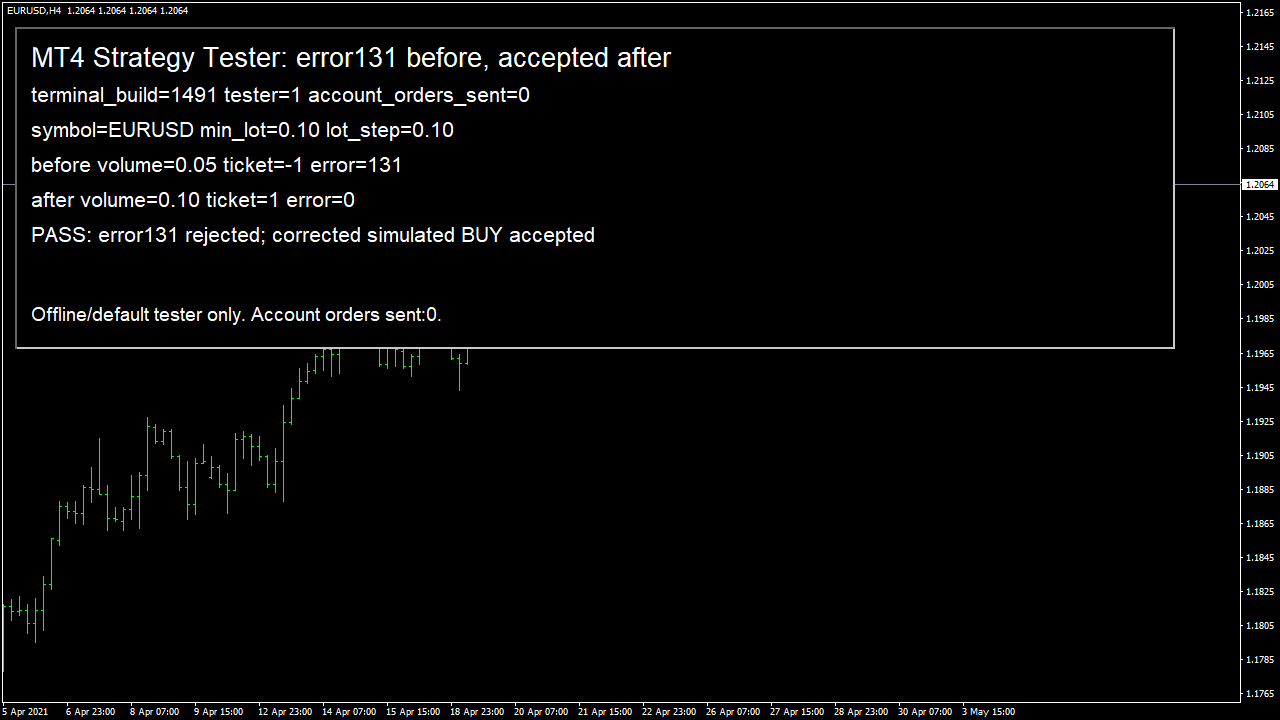
I ran this case in the native MT4 Strategy Tester, build 1491, on EURUSD H4 for 3–4 May 2021. The program refuses to run outside the tester. The symbol reported a minimum of 0.10 lot and a step of 0.10. I first requested half the minimum,0.05. OrderSend returned minus one and GetLastError returned 131. I then requested the minimum,0.10. That request returned ticket 1 with error 0. I selected the simulated order and read back its volume as 0.10, then closed it inside the tester. No account order was sent. The result shows the smallest useful correction for this specific failure: use a volume the symbol allows. It does not justify rounding every calculated volume upward. If your risk calculation asks for less than the broker minimum, making the position larger changes your risk. Stop that trade and explain the mismatch instead. MT4 uses 131 for invalid trade volume. A request with a completely invalid function argument can produce another error instead; the code number from the actual failed request decides which case you have.
Three code paths to check
1. Your calculated lot size is below the minimum
Read MODE_MINLOT for the exact symbol, not a value remembered from another account. A calculated 0.05 cannot be submitted where the minimum is 0.10. Keep the original risk calculation in the log. If the allowed minimum would exceed your planned loss, stop the request rather than doubling the size to make it pass.
2. The size does not fit the lot step
Read MODE_LOTSTEP and check whether the proposed size belongs to the allowed set. Formatting a number to two decimal places only changes its appearance; it does not prove that the broker permits that increment. Keep this check next to the request so that later sizing changes cannot bypass it.
3. A copied setting exceeds the symbol maximum
Read MODE_MAXLOT too. The same account can expose different rules for different symbols. Check positive values, the minimum, the maximum and the step together. A missing or unusable symbol property should stop the order path and produce a readable log, rather than silently falling back to a guessed lot size.
Own pattern: reject a size that does not fit the symbol
Use this check before the send path and log the proposed size with all three symbol properties. If it returns false, leave the calculated size unchanged and stop the order. Decide separately whether your rule can take an allowed size at its intended risk. The native case used 0.10 after explicitly selecting the symbol minimum; it did not secretly increase an arbitrary risk-sized position.
bool VolumeAllowed(string symbol, double lots)
{
   double minLot = MarketInfo(symbol, MODE_MINLOT);
   double maxLot = MarketInfo(symbol, MODE_MAXLOT);
   double step = MarketInfo(symbol, MODE_LOTSTEP);
   if(step <= 0 || minLot <= 0 || maxLot < minLot) return false;
   if(lots < minLot || lots > maxLot) return false;
   double steps = lots / step;
   return MathAbs(steps - MathRound(steps)) < 1e-8;
}
These are simulated EURUSD orders in the native MT4 tester, using its loaded symbol rules. Check the intended demo account separately before applying any change to your EA.
How you know it is fixed
Before: below the minimum
With minimum 0.10 and step 0.10, requested 0.05 must be rejected. The native run returned ticket minus one and error 131, with no simulated position opened for that request.
After: allowed minimum
Requested 0.10 passed in the native tester. The log recorded ticket 1, error 0 and selected order volume 0.10. Check the selected order, not just the function return.
Keep the risk decision separate
A calculated size below the minimum stops. A size above the maximum or off the step stops too. Do not turn a rejected size into a larger position without an explicit sizing decision.
Your own source
Find the next line to check
Start with the free EA-Check. Your code stays in your browser. It highlights patterns with line numbers; it does not prove the broker accepts an order.
Want one small change shown on your own case?
SOLVED-FIRST: one small fix or change to your own case, shown first as screenshots or a short screen video. 15 USD fixed (or the higher platform minimum), first five paid orders only during 4–17 October 2026. The file follows within 24 hours after funding. Close on Upwork first; marketplace cases stay on their marketplace.
Outside that sprint: R49: one authorised, reproducible MT4/MT5 defect, with three agreed cases. 49 USD fixed. Delivery within 48 hours after source review and funding. The exact case is agreed before funded work.
Send the expected and actual behaviourRelated checks
Common questions
Is 0.01 lot always valid?
No. Read the minimum and step for the current symbol. A micro-lot setting from another account can be below this account’s minimum.
Will NormalizeDouble fix error 131?
It can format a value but it cannot establish the permitted lot increments. Check the symbol rules and the planned risk before deciding which volume to send.
Sources and limits
These public questions explain the error; use your own EA log to check whether the same cause applies.