MT5 · code and request checks
MT5 error 10006: keep the rejection before trying again
Your EA can receive a rejection without learning its cause. In my MT5 test, 3 synthetic return-code checks passed and no orders were sent. I keep rejection, placement and completion separate before considering another request.
Arnold Holm · 2026-10-17
What the error means
A trader asked how to check a failed order and send it again. The reported code was 10006, with no useful explanation in the journal. That is a good reason to preserve the complete result. It is not enough evidence to choose a new entry price, widen a setting or retry on every tick. An EA is a program that applies your trading rules; it also needs a clear rule for an uncertain execution result. The official return-code table calls 10006 a rejected request. That label does not identify one universal broker cause. Keep the returned comment and any external return code beside the request, including its symbol, type, volume and timestamp. If those fields do not explain the rejection, preserve the uncertainty rather than writing a cause into the log. A true return from OrderSend is not itself proof that a market trade completed. The result and later transaction events need checking. In particular, an order being placed and a request being completed are different states. A local classifier can keep those states distinct. It cannot discover a broker's missing explanation.
Three code paths to check
1. A short label hides the result.
A log line that says only rejected loses the fields needed for the next check. Keep one timestamped record for the submitted request and its returned result. Give it a local identifier so later order and deal events can be matched to that request. A screenshot of the current chart cannot replace those earlier values.
2. Placement is mistaken for a fill.
The tested example treats synthetic 10008 as placed, not filled. It treats synthetic 10009 as completed, with a separate reminder to reconcile the deal. Do not turn a general function success flag into a claim about an account position. Check the relevant order, deal and position state for the operation you actually requested.
3. An automatic retry skips reconciliation.
Another request needs its own decision. First establish whether the earlier operation is rejected, still processing or reflected in history. Keep the original trading intent distinct from its attempts. Reusing a signal without checking the earlier attempt can produce an unintended second entry. This example deliberately contains no retry loop.
Three synthetic states in native MT5
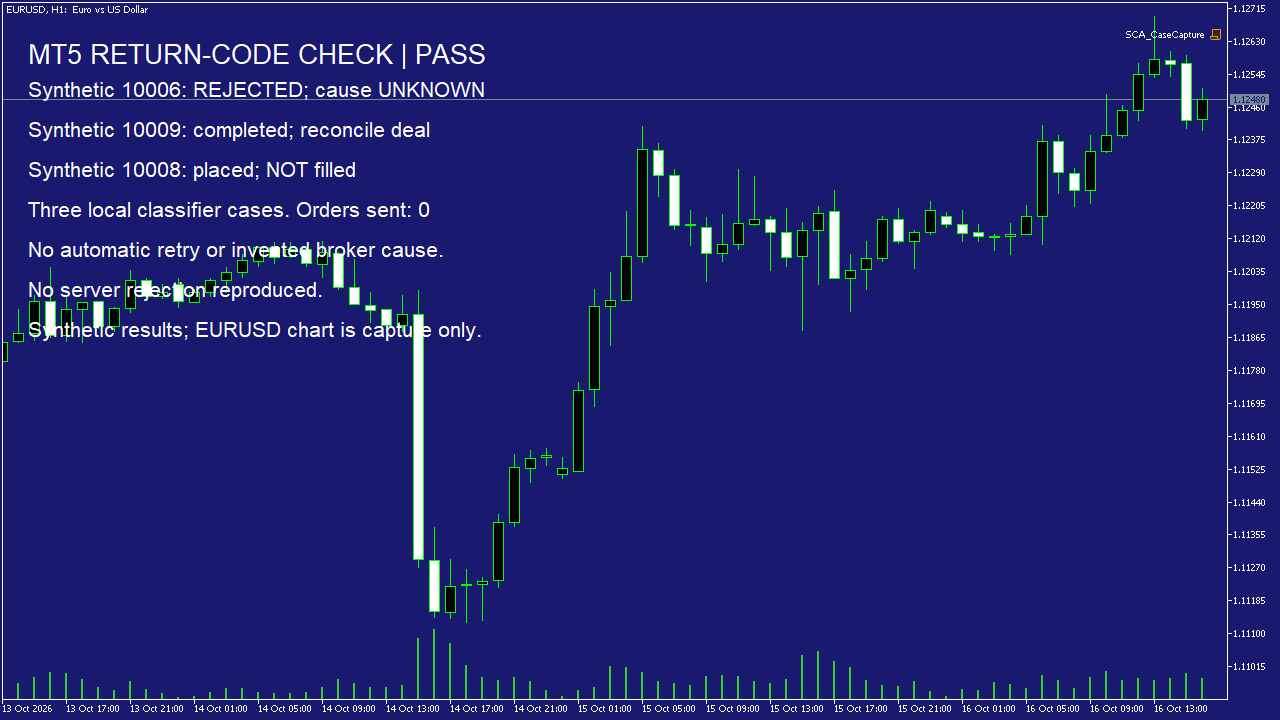
I compiled and ran an original script in native MT5. It supplied three fixed numbers to the classifier. The runtime log retained 10006 as rejected with an unknown reason, 10009 as completed with a reconciliation reminder, and 10008 as placed but not filled. All three comparisons passed. The compiler log and native chart capture accompany the run. These inputs were chosen examples. The script called neither OrderSend nor OrderCheck. The EURUSD chart was only the capture surface. This is a small check of local result handling, not a test of a broker's response, network delay or an EA's complete execution logic.
string Classify(uint code) {
 if(code==TRADE_RETCODE_REJECT) return "REJECTED_REASON_UNKNOWN";
 if(code==TRADE_RETCODE_DONE) return "COMPLETED_RECONCILE_DEAL";
 if(code==TRADE_RETCODE_PLACED) return "PLACED_NOT_FILLED";
 return "UNCLASSIFIED_RECONCILE";
}
Zero account orders. No server rejection reproduced. No broker cause established. Three synthetic classifier cases, not a complete order-state machine.
How you know it is fixed
Rejection stays a rejection
Synthetic 10006 remains rejected with reason unknown. It does not become a fabricated spread, stop or margin diagnosis.
Placed stays separate from completed
Synthetic 10008 and 10009 take different paths. Neither input alone proves a particular account position.
Your five-minute result check
Open one rejected request and compare its returned code, comment, order and deal fields with its original request and timestamp. Check whether your log retained the full result or only a short label. If the reason is absent, keep it unknown. Do not silently replace that missing evidence with a retry assumption.
Your own source
Find the next line to check
Start with the free EA-Check. Your code stays in your browser. It highlights patterns with line numbers; it does not prove the broker accepts an order.
Want one small change shown on your own case?
SOLVED-FIRST: one small fix or change to your own case, shown first as screenshots or a short screen video. 15 USD fixed (or the higher platform minimum), first five paid orders only during 4–17 October 2026. The file follows within 24 hours after funding. Close on Upwork first; marketplace cases stay on their marketplace.
Outside that sprint: R49: one authorised, reproducible MT4/MT5 defect in readable source up to 500 lines, with three agreed cases. 49 USD fixed. Delivery within 48 hours after source review and funding. The exact case is agreed before funded work.
Send the expected and actual behaviourRelated checks
Common questions
Does 10006 tell me which setting to change?
No. It labels the rejection. Inspect the complete result and request before choosing a correction.
Did this run reproduce a broker rejection?
No. It tested three chosen return codes in a local classifier. It sent no account orders.
Sources and limits
- Trader question: check a rejected order before sending again
- Official MT5 return-code reference
- Official OrderSend result and transaction handling
- Official trade-result structure
These public questions explain the error; use your own EA log to check whether the same cause applies.