MT5 · code and request checks
MT5 error 10014: check the lots your EA actually requests
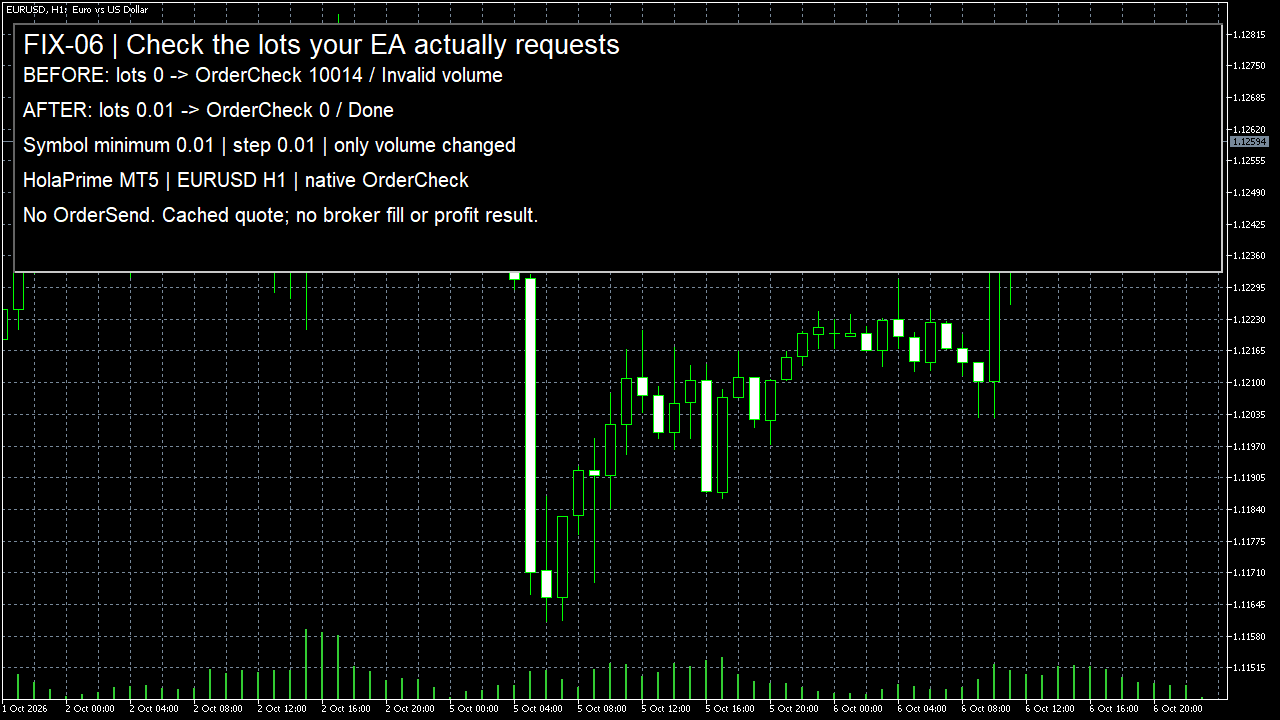
If your EA returns 10014, print the lots it actually put in the request. My native EURUSD check rejected 0 lots with Invalid volume. The same request at the symbol minimum of 0.01 returned 0, Done. This checks a volume mistake; it does not tell you to increase the risk of your own trade.
Arnold Holm · 2026-10-06
What the error means
Your lot-size calculation and the order request can disagree. A very small risk amount, a failed property read or rounding in the wrong place can leave the request with zero lots. That is what I isolated here. I compiled my own script in HolaPrime MT5 and read the symbol minimum, maximum and lot step. EURUSD reported a minimum of 0.01, a maximum of 100 and a step of 0.01. I built a SELL request with valid protection prices, then called OrderCheck with zero volume. It returned 10014 and Invalid volume. I changed only volume to the recorded minimum and called the check again. The corrected request returned 0 and Done. No OrderSend call exists in the script. Before that final run, early terminal startup attempts reached Common error and Invalid stops. I kept those logs. The isolated terminal had not yet finished restoring the quote used for protection prices. Waiting for that restore and checking both Bid and Ask made the intended comparison possible. A volume error should be separated from those other failures, not used to explain every rejected request.
Three code paths to check
1. The final request contains zero lots
Read request.volume at the point where the check happens, after your risk calculation and rounding. Do not rely only on the earlier settings panel. If the result is below the symbol minimum, stop this trade and explain why. Raising it to the minimum can increase the cash risk beyond the rule you agreed.
2. The amount does not fit the symbol lot step
A legal number must fit the minimum, maximum and lot step for the request symbol. Decimal rounding alone is not the same as rounding to the permitted step. Keep the requested amount and the symbol values together in the log so another symbol or account cannot silently supply different rules.
3. Missing properties or another rejected field
If a symbol-property read fails, do not continue with an assumed minimum or step. Keep that failure separate. A corrected lot amount can still leave an invalid stop, unsupported filling choice or unavailable account. The saved early attempts in this case show why a changed error code deserves its own investigation.
Own pattern: read the final lot amount before a read-only check
Use this read-only check to stop an invalid amount before constructing a send path. It does not change volume, increase risk or retry a trade. The native case deliberately used the symbol minimum as a controlled comparison, not as a suggested position size. The screenshot shows the actual terminal result, and the log retains the exact request values.
bool CheckVolume(const MqlTradeRequest &request)
{
   double minimum = 0, maximum = 0, step = 0;
   if(!SymbolInfoDouble(request.symbol, SYMBOL_VOLUME_MIN, minimum) ||
      !SymbolInfoDouble(request.symbol, SYMBOL_VOLUME_MAX, maximum) ||
      !SymbolInfoDouble(request.symbol, SYMBOL_VOLUME_STEP, step) ||
      step <= 0 || minimum <= 0) return false;
   PrintFormat("requested=%.8f min=%.8f max=%.8f step=%.8f",
               request.volume, minimum, maximum, step);
   if(request.volume < minimum || request.volume > maximum) return false;
   double units = request.volume / step;
   return MathAbs(units - MathRound(units)) < 0.00000001;
}
This isolated HolaPrime EURUSD check sent no order and measured no strategy result; your own EA still needs its complete request, account checks and observed execution.
How you know it is fixed
When it should continue: amount allowed by this symbol
The final amount is within the recorded minimum and maximum and fits the lot step. In this native case 0.01 passed the volume comparison and the complete read-only request returned Done. Keep the quote and protection prices beside that result.
When it should stop: result below the minimum
A zero amount is stopped. If your risk calculation produces an amount below the minimum, show that fact rather than rounding it upward and changing the risk. The native zero-lot request returned 10014.
Another case: different symbol or failed property read
Read the new symbol values or stop the path. Recheck the entire request if the error changes. A clean volume comparison does not remove a stop-price or account error, and a successful OrderCheck does not mean that an order was filled.
Your own source
Find the next line to check
Start with the free EA-Check. Your code stays in your browser. It highlights patterns with line numbers; it does not prove the broker accepts an order.
Want one small change shown on your own case?
SOLVED-FIRST: one small fix or change to your own case, shown first as screenshots or a short screen video. 15 USD fixed (or the higher platform minimum), first five paid orders only during 4–17 October 2026. The file follows within 24 hours after funding. Close on Upwork first; marketplace cases stay on their marketplace.
Outside that sprint: R49: one authorised, reproducible MT4/MT5 defect, with three agreed cases. 49 USD fixed. Delivery within 48 hours after source review and funding. The exact case is agreed before funded work.
Send the expected and actual behaviourRelated checks
Common questions
Should I replace every small result with 0.01 lots?
No. That number was this EURUSD minimum. If the permitted minimum exceeds your intended cash risk, stop the trade. Read the correct symbol properties rather than copying a number.
Does Done mean my EA placed a trade?
No. This script only called OrderCheck. A send and a confirmed order or position would be separate events. Keep their results separate in your log.
Sources and limits
- Official MQL5 return codes: 10014 Invalid volume
- Official symbol minimum, maximum and volume step
- Official OrderCheck and result limits
- Observed EA question: XAUUSD Buy 0.00 lots returned10014
These public questions explain the error; use your own EA log to check whether the same cause applies.