MT5 · code and request checks
MT5 error 10018: trade mode is not a session clock
Your EA can see full trade mode while the symbol is outside a trading session. My MT5 run passed 5 local session checks and sent zero orders. I treat missing session data as unknown before another request.
Arnold Holm · 2026-10-17
What the error means
A trader reported error 10018 at midnight in a backtest. Starting at 00:01 changed that example, while checking SYMBOL_TRADE_MODE_FULL had not prevented it. That is a useful boundary to investigate. It does not make 00:01 a safe opening time for every broker, symbol or test date. An EA is a program that applies your trading rules; it also needs to distinguish permission to trade from the time at which trading is available. Trade mode describes the operations a symbol permits. It is not a clock for its trading sessions. The official SymbolInfoSessionTrade function reads a symbol's session entry for a weekday and index. The index begins at zero, and a weekday can have several entries. A session lookup belongs beside the symbol and server timestamp in the error record. A desktop clock or an opening time copied from another broker is not the same evidence. My small example tests a deliberately chosen same-day interval. It also reads the current terminal's weekly session table separately. Those two results answer different questions: the chosen interval checks my boundary logic, while the native read shows the data available to that terminal at the time of the run. Neither reconstructs the broker's historical schedule for the original forum question.
Three code paths to check
1. Trade permission is used as a clock.
A full trade-mode flag does not establish that the current server time falls within a session. Keep the operation permission and schedule checks separate. A schedule match still cannot promise the server will accept an order; the actual result remains the authority for that request.
2. A boundary is checked in the wrong time basis.
Record the symbol, server timestamp, weekday and session index. Define whether the interval includes its start and excludes its end. Test the exact opening and closing values. Overnight intervals, multiple sessions, holiday exceptions and historical changes need their own explicit handling; they are outside this five-case example.
3. Missing data becomes an invented opening time.
A failed lookup does not supply an interval. Keep the lookup outcome and error information, and retain an unknown state until its meaning is established. Do not silently substitute a universal midnight or 00:01 opening. In this example, missing data and an unsupported overnight interval both prevent a request.
Five local boundaries in native MT5
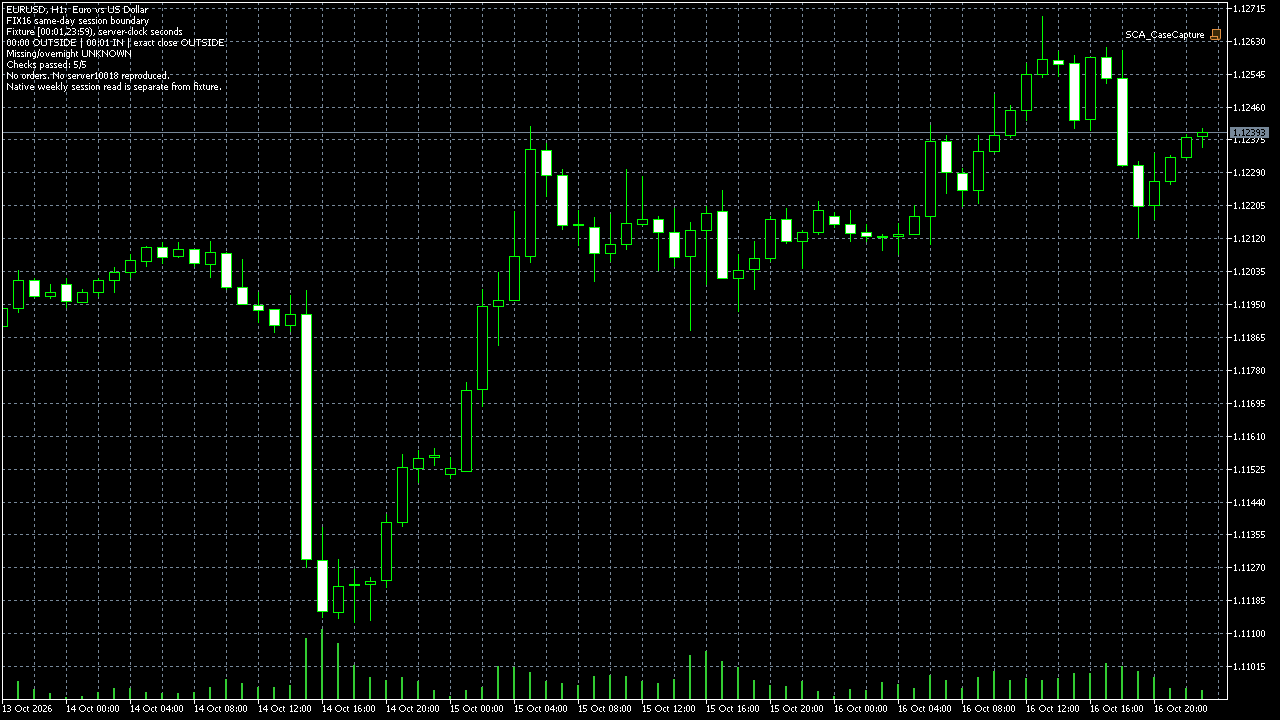
I compiled and ran an original script in MT5 build 6230. Its chosen interval was [00:01,23:59), expressed as seconds on the server clock. The checks kept 00:00 outside, 00:01 inside and the exact closing time outside. Missing session data and an unsupported overnight interval remained unknown. All five comparisons passed. The separate native weekly read returned entries for EURUSD with trade mode 4. The log preserves the read outcomes and displayed times. I do not use those displayed values as a general broker schedule. The script called neither OrderSend nor OrderCheck. The chart capture and runtime log show the local checks, not a trade execution.
string SessionState(bool data,int now_s,int from_s,int to_s) {
 if(!data || now_s<0 || now_s>=86400 ||
    from_s<0 || to_s>86400 || from_s>=to_s)
   return "UNKNOWN_NO_REQUEST";
 if(now_s>=from_s && now_s<to_s)
   return "IN_SCHEDULE_RECHECK_RESULT";
 return "OUTSIDE_SCHEDULE_NO_REQUEST";
}
Zero orders. No server 10018 reproduced. These hours are chosen test inputs, not broker hours. Same-day logic only; no complete weekly, overnight, holiday or historical scheduler.
How you know it is fixed
The exact boundary has a defined result
For the chosen [00:01,23:59) interval, 00:00 and 23:59 are outside; 00:01 is inside. Inside means recheck the actual result, not guaranteed execution.
Unknown stays unknown
Missing data and an unsupported overnight interval do not fall through to a request. Keep the lookup outcome instead of inventing a session.
Your five-minute session check
Compare one failed request's symbol, server timestamp, weekday and session index with the session data recorded for that run. Check whether your code used trade mode as a substitute for the session clock. Keep the actual returned error beside that record.
Your own source
Find the next line to check
Start with the free EA-Check. Your code stays in your browser. It highlights patterns with line numbers; it does not prove the broker accepts an order.
Want one small change shown on your own case?
SOLVED-FIRST: one small fix or change to your own case, shown first as screenshots or a short screen video. 15 USD fixed (or the higher platform minimum), first five paid orders only during 4–17 October 2026. The file follows within 24 hours after funding. Close on Upwork first; marketplace cases stay on their marketplace.
Outside that sprint: R49: one authorised, reproducible MT4/MT5 defect in readable source up to 500 lines, with three agreed cases. 49 USD fixed. Delivery within 48 hours after source review and funding. The exact case is agreed before funded work.
Send the expected and actual behaviourRelated checks
Common questions
Should every EA wait until 00:01?
No. That was the boundary in one reported example. Read the relevant symbol's session data and retain the request's actual server time and result.
Did these checks reproduce error 10018?
No. They tested local same-day boundary handling and read a current weekly session table. They sent no order to the server.
Sources and limits
- Trader question: error 10018 at midnight despite full trade mode
- Official SymbolInfoSessionTrade reference
- Native local run: five checks and zero orders
These public questions explain the error; use your own EA log to check whether the same cause applies.