MT5 · code and request checks
MT5 error 10027: your terminal blocks automatic trading
Your EA can find a signal and still receive error 10027. In my EURUSD run, the terminal permission was 0 and the request was rejected with 10027. The corrected permission check kept the request stopped. Start with the Algo Trading permission, before changing your entry rule or sending the same order again.
Arnold Holm · 2026-10-07
What the error means
I kept automatic trading disabled for this run in HolaPrime MT5. I built an immediate EURUSD BUY request and called OrderSend. The native result was false, the returned code was 10027 and the terminal error was 4752. No account order executed. That gives you a concrete difference between finding a trade and being allowed to send it. The old decision simply assumed that a supplied signal meant ready. The corrected decision asks for the signal, the terminal permission and the permission of this program. With the native permissions off, it returns false. With enabled values supplied to the small helper it returns true; with no signal it returns false again. The enabled case checks the decision only. I kept trading disabled and did not demonstrate an accepted account order. MetaQuotes names 10027 as automatic trading disabled by the client terminal. Code 10026 names a server restriction instead. Read the actual number from the returned result so that you do not try to solve a broker restriction with a desktop button. An EA is a program applying your trading rules in MetaTrader. This error concerns permission to trade, before you can judge whether its entry rule is useful.
Three code paths to check
1. Algo Trading is off in this terminal
Look at the terminal where the EA is actually running. A different open MT5 window can have a different permission. Record TERMINAL_TRADE_ALLOWED when the request is made. If it is false, stop the request and explain that permission is missing. Repeating it on every tick produces more rejected calls without changing the cause.
2. The individual EA has no trading permission
Check the Allow Algo Trading setting for the attached EA as well as the terminal button. Record MQL_TRADE_ALLOWED in that same program. Enabling one permission does not establish that every other permission is available. Do this on the intended demo setup first, with the correct chart, source and inputs.
3. The log and the window describe different moments
A saved error may come from before you changed a setting, or from an EA on another chart. Record symbol, request time and permissions together. Keep the first result after the change so that you can compare the same request path. Do not erase the original error or assume the setting applied to every running instance.
Own pattern: permission is part of request readiness
Keep your signal calculation separate from this decision. The pattern does not turn trading on, change the entry rule or retry a rejected request. Your EA can report which permission is missing so that you can review the intended setup. After you enable the intended demo permissions, inspect the returned trade result and the actual order or position too. A permission check alone cannot show that the broker accepted an order.
bool RequestReady(bool signal, bool terminalAllowed, bool programAllowed)
{
   return signal && terminalAllowed && programAllowed;
}

bool ready = RequestReady(signal,
   (bool)TerminalInfoInteger(TERMINAL_TRADE_ALLOWED),
   (bool)MQLInfoInteger(MQL_TRADE_ALLOWED));
if(!ready) return; // keep the order path stopped
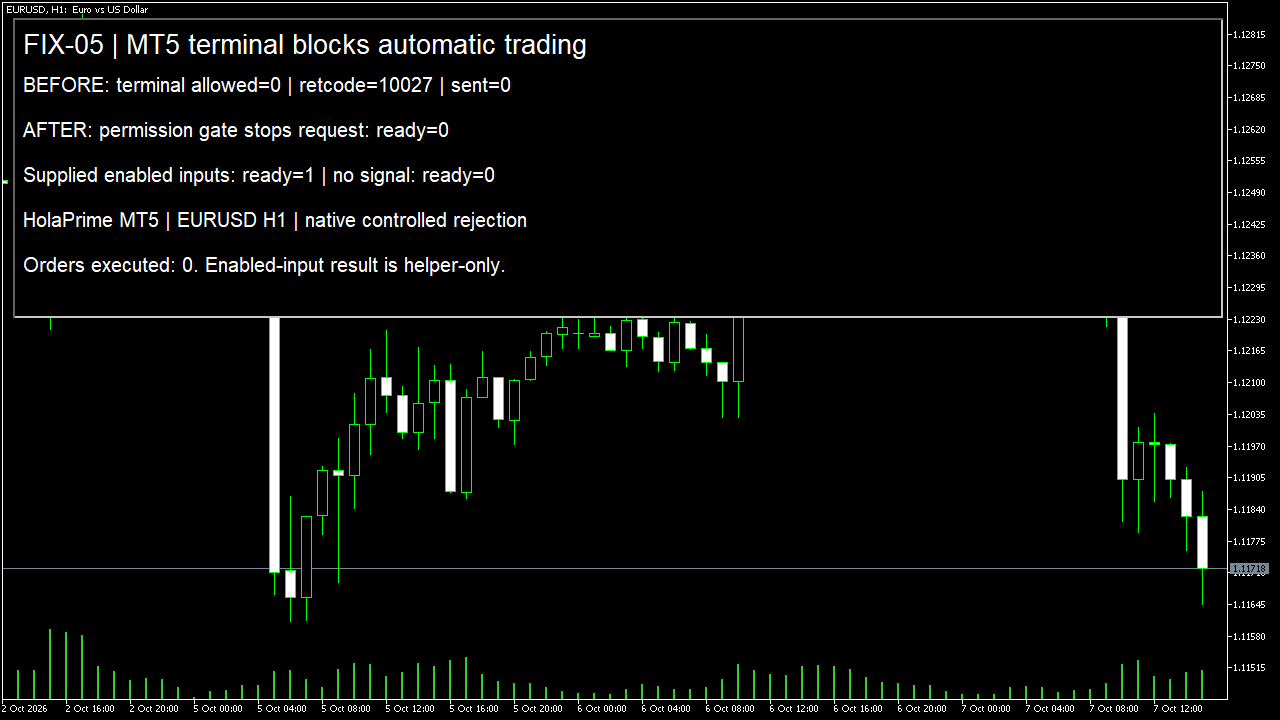
The screenshot shows a controlled native rejection and three helper decisions in EURUSD H1. It does not test a complete customer EA or a successful funded-account trade.
How you know it is fixed
When it stops: terminal permission is 0
A supplied signal is true, but readiness is false. The native controlled request returned 10027. Keep that result visible and prevent repeated requests while the permission remains missing.
When the helper continues: all supplied inputs are true
Signal, terminal permission and program permission set to true produce readiness true in the helper. This checks the decision without placing another account order.
When there is no signal
Enabled supplied permissions with signal false still produce readiness false. Fixing a permission must not make the EA trade when its entry rule says no.
Your own source
Find the next line to check
Start with the free EA-Check. Your code stays in your browser. It highlights patterns with line numbers; it does not prove the broker accepts an order.
Want one small change shown on your own case?
SOLVED-FIRST: one small fix or change to your own case, shown first as screenshots or a short screen video. 15 USD fixed (or the higher platform minimum), first five paid orders only during 4–17 October 2026. The file follows within 24 hours after funding. Close on Upwork first; marketplace cases stay on their marketplace.
Outside that sprint: R49: one authorised, reproducible MT4/MT5 defect, with three agreed cases. 49 USD fixed. Delivery within 48 hours after source review and funding. The exact case is agreed before funded work.
Send the expected and actual behaviourRelated checks
Common questions
Should I change the strategy when I see 10027?
First check permission in the actual running terminal and EA. Changing an indicator or entry rule does not grant permission to send orders.
Can the EA switch this permission on itself?
This pattern only reads permission. Review the intended terminal and EA settings yourself, then verify the next demo result. Keep server, account and symbol checks separate.
Sources and limits
These public questions explain the error; use your own EA log to check whether the same cause applies.