MT4 · code and request checks
MT4 error 4107: log the exact price before changing it
Your entry can look valid and still fail. My MT4 test returned error 4107 for an over-precise entry, then accepted current Ask.
Arnold Holm · 2026-10-24
What the error means
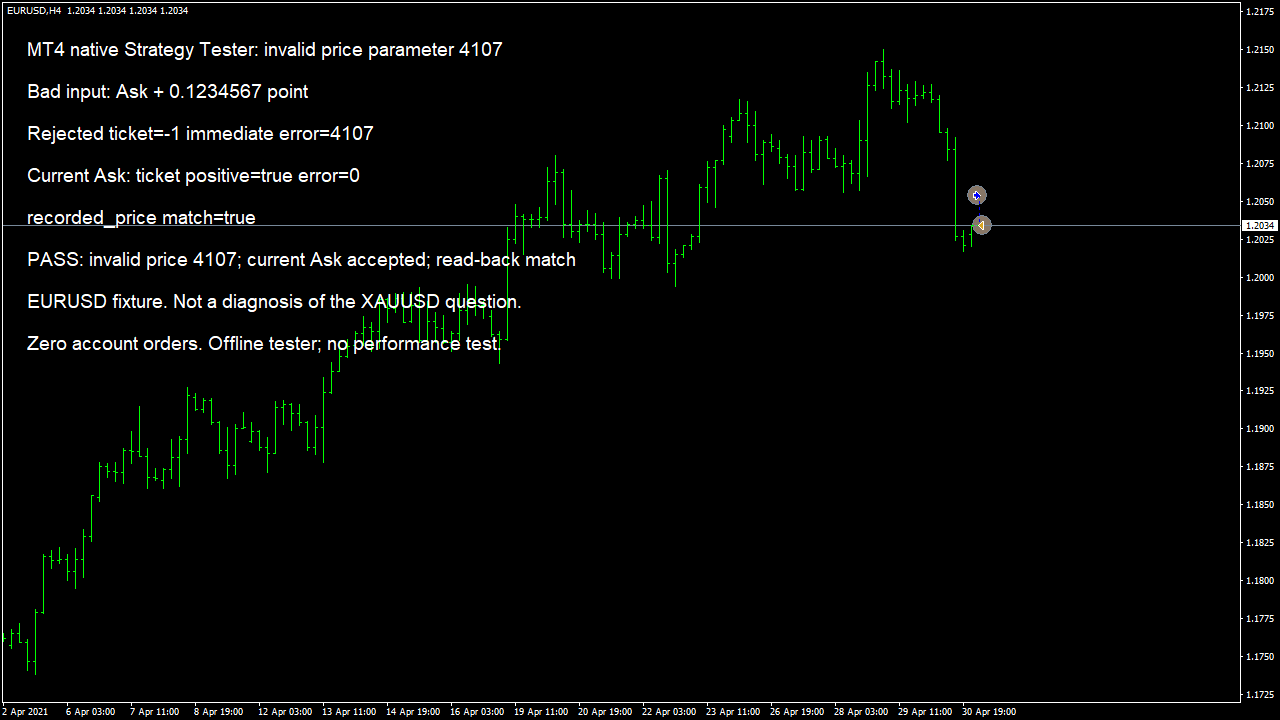
A trader testing XAUUSD reported an invalid price of 2347.42500000. The number looked close to the market. The trader had checked for negative inputs and tried normalization, but the error remained. Without the source and symbol settings, that report does not establish which argument was wrong. A plausible-looking number is not enough to diagnose an OrderSend call. I start by keeping three things together: the exact request, the function return value, and the error captured immediately after the call. The request includes entry, stop loss and take profit. Looking only at the entry price can miss a problem in a calculated stop or target. Printing fewer decimal places can also hide the input that the function actually received. The official MQL4 error table lists 4107 as ERR_INVALID_PRICE_PARAM. It separately lists 129 as ERR_INVALID_PRICE and 130 as ERR_INVALID_STOPS. Those numbers should not be swapped in a log or folded into one guessed explanation. The OrderSend reference describes price-thread and precision conditions for 129, and stop-distance conditions for 130. Record the number that your own terminal returned. I built a small native MT4 Strategy Tester test case to isolate an over-precise entry. On supplied EURUSD H4 history, it first submitted a simulated BUY at Ask plus 0.1234567 of one point. The deliberately altered price returned ticket -1 and error 4107. The next simulated BUY used the current Ask without that extra fraction. It returned a positive ticket and error 0. A fresh order selection confirmed that the stored entry matched Ask within half a point. The simulated position was then closed inside the tester. No order went to an account. The screenshot is the actual tester output from this run, not a mock trading result. The test case uses one EURUSD dataset and a fixed 20-point spread. It does not reproduce the trader's XAUUSD setup, inspect that person's source, or establish a universal rounding rule for gold. I diagnose the exact request before adding another retry. A retry with the same invalid input adds no new information. A retry after silently rounding a pending entry can change the trading rule. Keep the original value in the record, identify the field that fails validation, and decide whether a corrected candidate still satisfies the intended rule.
Three code paths to check
1. An entry calculation adds unsupported precision
In the native test case, adding a fractional point to Ask was enough to produce 4107. For a market BUY, use the current Ask for the actual order symbol. For a market SELL, use current Bid. A calculated pending entry has a different validation path and must retain the intended distance and direction after alignment.
2. A calculated stop or target is the bad input
Record stop loss and take profit alongside the entry. Check that every nonzero value is finite, has the intended sign and sits on the permitted price increment. Zero can mean no stop or target. Do not reject zero indiscriminately or silently replace a requested protective stop with zero.
3. Decimal formatting is mistaken for a valid price grid
Digits controls decimal precision. A symbol can also have a tradable price increment that needs separate handling. Rounding to a number of decimal places does not by itself prove that a calculated price is on that grid. Read the symbol specifications and keep point, tick increment and pip conventions distinct.
Keep the failing input and immediate error in one record
The excerpt is deliberately invalid and belongs only in a tester. Its purpose is to show the input that caused this local failure. It is not an EA entry routine. The full test case refuses to initialize outside IsTesting, checks the successful order by ticket, reads back its open price, closes the simulated position and requires every expected result before printing PASS. The change in this test case was to stop altering a valid terminal quote. It was not a general instruction to round every value. For a real EA, first select the correct symbol and request type. Read fresh prices for that symbol. Validate calculated pending prices and stops against their own requirements. If alignment moves a level, check that the resulting request still represents the rule you intended to trade. ResetLastError before the attempt and capture GetLastError immediately afterward. Other calls can change the saved error. Treat a failed ticket as a failed attempt, not as an open position. If the request is accepted, select the returned ticket and read the stored values. That gives you evidence of what happened instead of relying on a success message alone.
// Native tester test case only. OnInit rejects !IsTesting().
double badPrice = Ask + Point * 0.1234567;
ResetLastError();
int ticket = OrderSend(Symbol(), OP_BUY, 0.1, badPrice,
                       10, 0, 0, "FIX26 invalid", 260026, 0, clrNONE);
int error = GetLastError();
// Observed in this test case: ticket = -1, error = 4107.
// A separate call using current Ask returned a positive ticket and error 0.
Native MT4 offline tester, supplied EURUSD H4 history, 3 May 2021, fixed 20-point spread. One invalid entry and one accepted simulated entry. No XAUUSD diagnosis, broker execution, latency or strategy performance claim.
How you know it is fixed
Negative case: preserve the deliberately invalid input
Run the supplied test case only in the Strategy Tester. Its fractional-point entry must fail with ticket -1 and captured error 4107 in the documented environment. An unexpected result is a failed test, not permission to change the expected number.
Positive case: read back the accepted simulated entry
The current-Ask call must return a positive ticket and error 0. Select that ticket again and compare its stored entry with the requested Ask. Close the simulated position and keep the complete result log.
Your five-minute source check
Find the failing OrderSend. Print its symbol, operation, entry, stop, target, Digits, Point, symbol price increment, Bid and Ask. Keep enough precision to expose the actual arguments. Check all three price fields before changing rounding or retry behaviour.
Your own source
Find the next line to check
Start with the free EA-Check. Your code stays in your browser. It highlights patterns with line numbers; it does not prove the broker accepts an order.
Want one small change shown on your own case?
DEMO0: send the problem and try a free compiled demo first. R49: one authorised, reproducible MT4/MT5 defect in readable source up to 500 lines, with three agreed cases. 49 USD fixed. Delivery within 48 hours after source review and funding. The exact case is agreed before funded work.
Send the expected and actual behaviourRelated checks
Common questions
Does 4107 prove that my broker rejected the order?
The number alone does not establish a broker-side rejection. Keep the exact request and local return value. This offline test case reproduced 4107 without sending any account order.
Will NormalizeDouble fix every invalid-price report?
No. Decimal precision, the symbol price increment, request direction and stop distances are separate checks. The right correction depends on the actual failing field and intended rule.
Did this test solve the original XAUUSD report?
No. The original report did not include enough source and symbol details. This is an independently reproduced EURUSD precision failure with an explicit before-and-after check.
Sources and limits
- Original XAUUSD invalid-price question, unresolved source details
- Official MQL4 runtime error codes
- Official MQL4 OrderSend parameters and return values
These public questions explain the error; use your own EA log to check whether the same cause applies.